Two Ways to Target Your Donors
Last updated: October 8, 2026
There are now two ways to build a donor audience in the Audience Builder: the legacy Donations filter that exists today, and the new Enhanced Donations filter (Beta). You can switch between them or try them separately while you build, so you can see your audience both ways and pick what works for you.
The Legacy Donations Filter
The legacy filter works the way donation targeting always has on Switchboard. In phone audience building, the Have donated filter includes phone numbers that were entered as part of a donation through any of your connected donation sources (ActBlue, Count on Me, and others).
Because not everyone provides a phone number when they donate, capturing all of your donors with the legacy filter usually means combining it with a second filter:
Have donated (where a phone was provided at the time of donation)
Have donated via Switchboard (Engagement) — donors who gave through your Switchboard broadcasts or email blasts via a tracked Switchboard refcode.
Set these together in a group with an "OR" condition so anyone matching either one is included.
The Enhanced Donations filter (Beta)
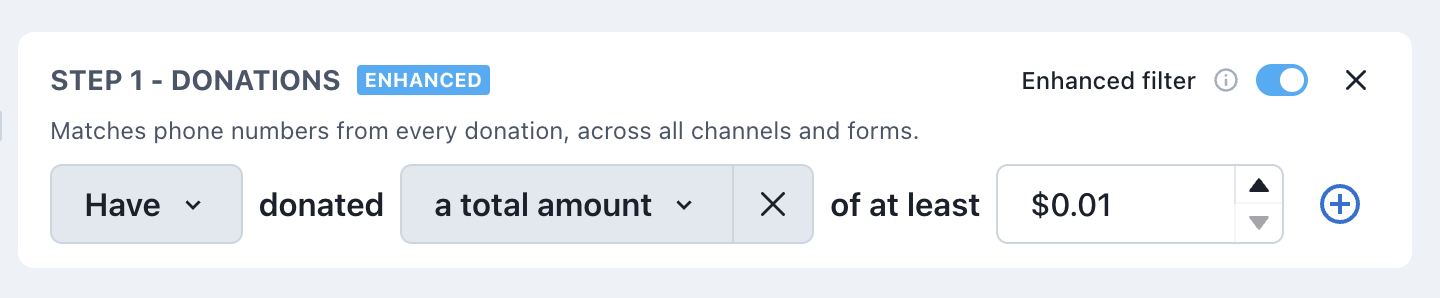
The enhanced filter does all of that in a single step. It captures more of your donations, including those made in response to a Switchboard message (Engagement), and more accurately recognizes when separate donations come from the same supporter, so they're captured even if only some of their donations included a phone number. One Donations filter gives you a more complete and more accurate picture of who has given to your organization and how much they have donated.
Trying both
You can switch between legacy and enhanced while you're building your audience:
In the Audience Builder, add or open the Donations filter.
Use the toggle at the top of the filter to switch between the existing filter and enhanced.
Build your audience and compare the results. Switch back and forth as much as you like, nothing is saved until you save your audience.
Why your counts may differ between the two
When you compare the two filters, the enhanced count will likely be higher than the legacy count, but in some cases may be lower. Both are expected, and both mean the enhanced number is a more accurate reflection of your donor base:
The enhanced count may be higher because it finds donors the legacy filter missed on its own, like supporters who gave without entering a phone number, supporters who gave in response to a message, or who you know through another channel (e.g. donated via email). These are real donors who simply weren't showing up before we did this new matching.
The enhanced count may be lower because it checks that each number is valid up front whereas the legacy filter includes poorly formatted phone numbers that are filtered out at send time.
Which should I use?
Both are available, so you can use whichever you're comfortable with. The enhanced filter is the simplest way to capture all of your donors in one place, and we'd encourage you to try it and compare. If you'd like help understanding a difference in your numbers, reach out to support@switchboard.com and we're happy to walk through it with you.