Using A Default Profile To Test Broadcasts
Last updated: October 31, 2025
You can now use a default profile to preview and test how your custom messages will look in Switchboard without an attached audience! QA your messages to ensure your customizations populate correctly based on the recipient's available custom field information.
What is A Default Profile?
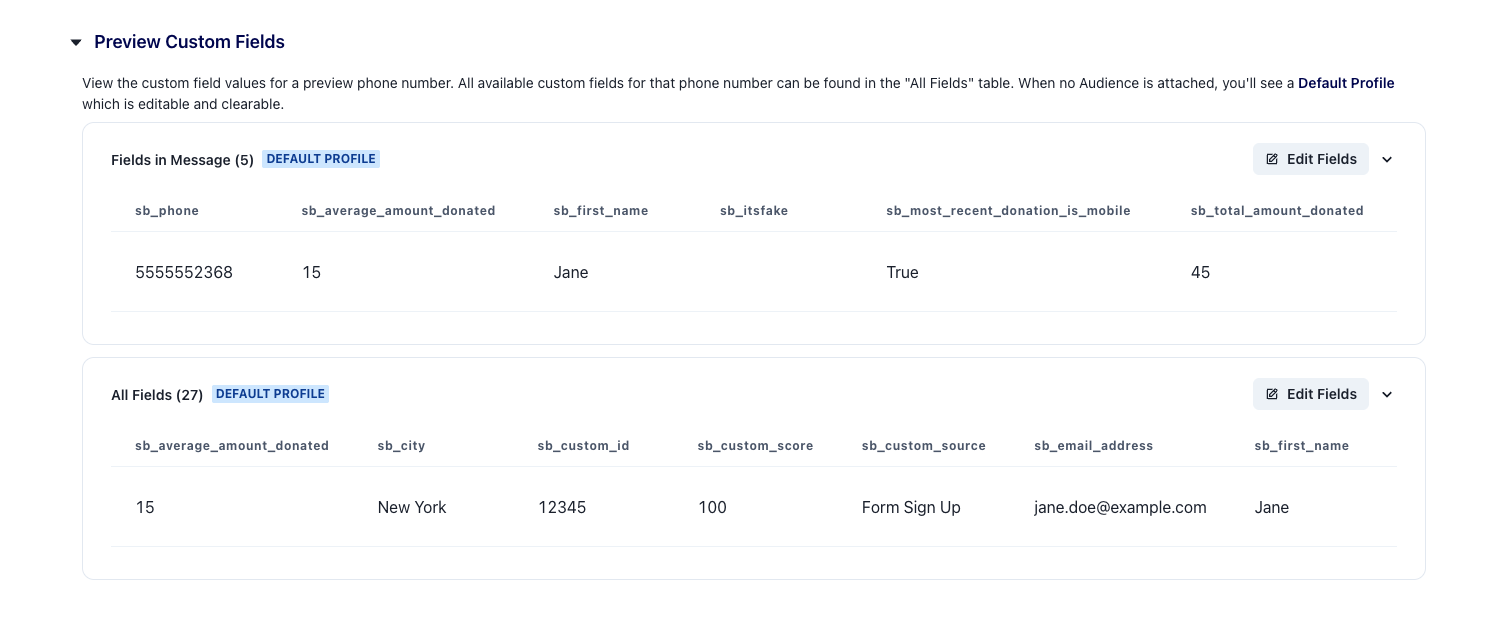
A dummy profile with fake information on the contact that allows Switchboard users to view how their texts would appear for a recipient and adjust the available information to pressure test copy. This Default Profile will be shown under the Message Preview area if the user has not attached an audience to their broadcast.
You can send a test message to any provided lists or phone numbers without attaching an audience to the broadcast. The test messages will use the field values from the Default Profile.
Switchboard's Default Profile is named Jane, and looks as follows:
Customizing The Default Profile
Users have the ability to make edits to the Default Profile, and completely remove information, if they'd like to see how their customizations would populate based on different recipients. To do this click the pencil on the right hand side of the page and make edits to the fields.
Note: The edits that you make will not be saved to the Default Profile for future broadcasts
Default Profile Limitations:
The Default Profile is not available for use with Email Blasts or when working with Dynamic Media. If you want to preview your messages using Dynamic Media you will need to attach an Audience when building out your broadcast.