September 2026 Product Update
Last updated: October 16, 2026
🧪 A/B Testing for Broadcasts
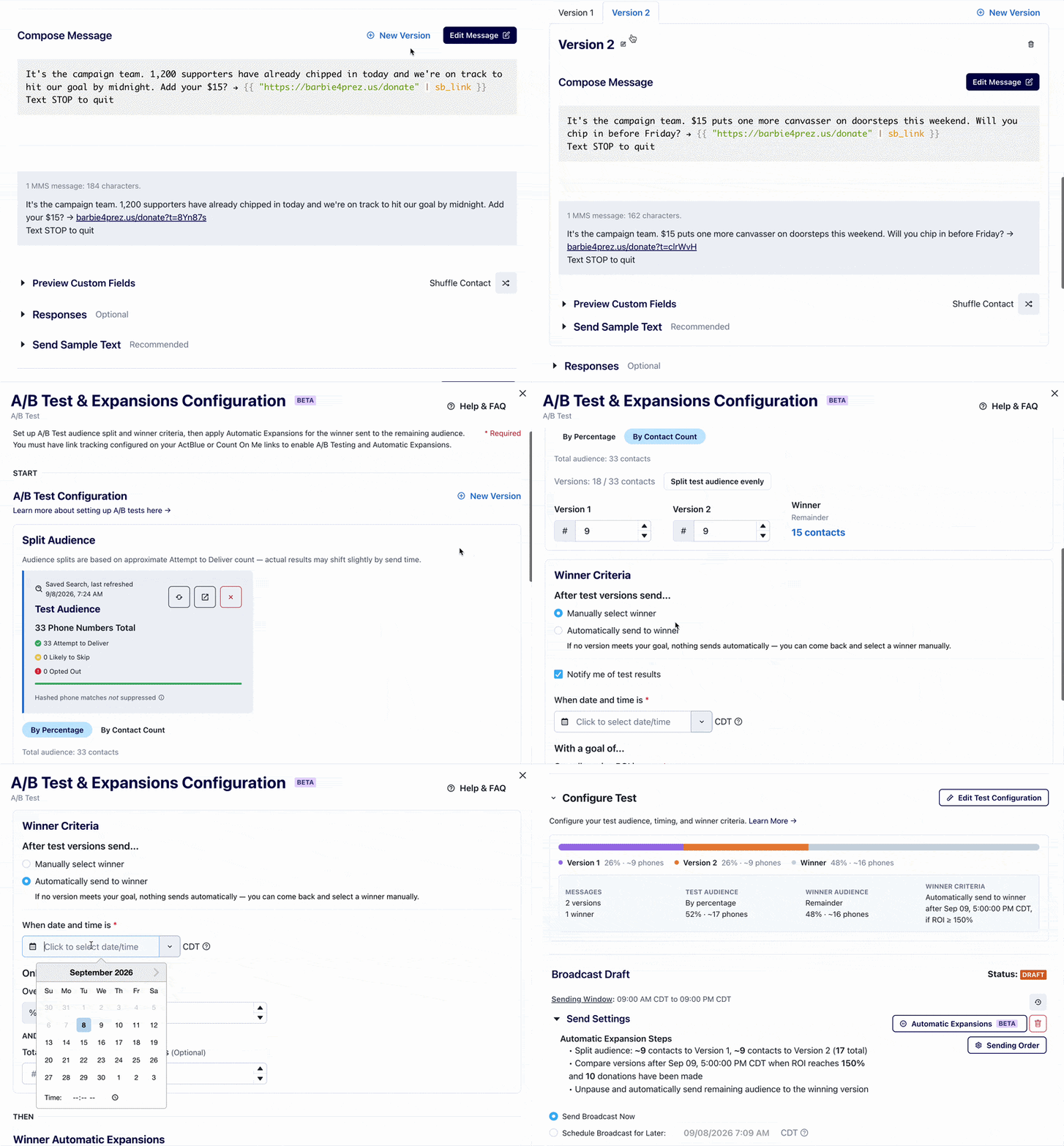
We're so excited to launch A/B Testing for broadcasts! A/B Testing lets you send two to seven different versions of a broadcast to a segment of your audience, see which one performs best, and automatically (or manually) send the winning version to the rest of your audience. No more building and sending separate broadcasts by hand.
Here's how it works:
Create your versions — Start a new broadcast (or open a draft), then click "+ New Version" in the upper right corner of the broadcast editor to create up to 7 test versions. Edit each variant's message content and links.
Set your test audience and split — Attach a List or Saved Search, then split the audience across your variants by percentage or exact count. The remainder is reserved for the winning version.
Choose your winner criteria — Select your winning metric (ROI and/or minimum donation count) and set an evaluation date and time for when Switchboard should check results.
Choose how the winner gets sent — Two options:
Automatic Send: Switchboard evaluates your winner criteria at the set date/time and automatically sends the winning version to your remaining audience — no action needed.
Manually Select: Switchboard pauses the broadcast at the evaluation date/time and shows you the results, so you can confirm the winner or manually select a different one.
📚 Learn how to set up an A/B test →
We would love your feedback as you try out this new feature. Please send any questions, comments, or requests related to A/B testing to support@oneswitchboard.com!
🔄 Introducing Number Cycling
A new feature that lets you permanently retire an existing 10DLC sending number and replace it with a fresh one. You might want to cycle a number if you've already used all of the numbers in your 10DLC pool and feel like net new numbers could help your deliverability. You can cycle up to 5 numbers per day.
Note: Number Cycling isn't guaranteed to improve performance, but it's a lever worth testing!
📚 Learn more about Number Cycling →
📡 Number Type Selection
You can now select your sending number type (10DLC or Toll-Free) directly on the broadcast page! You'll see the sending number selector on the broadcast detail page showing all of your active sending number types — making it easier to choose the right sending configuration for each broadcast.
🤖 (Beta) Describe Your Audience in Audience Builder
Building an audience just got a lot easier. Instead of adding filters one at a time, you can describe the audience you want in plain language and Switchboard will automatically build the criteria for you!
Try descriptions like:
"Recurring donors in the last 30 days"
"Folks in the Collective who received a broadcast in the past 6 months and replied at least once but no more than 3 times"
"Exclude anyone with the 'do not text' label"
"Limit it to a random sample of 500"
You can keep refining your description to narrow things down, and everything it builds shows up as normal filters you can still edit manually. You can even reference specific labels, broadcasts, or other items by name — or type @ to search directly.
📚 Learn more about Describe Your Audience →
📋 Duplicate Count On Me Forms Across Organizations
You can now duplicate Count On Me forms across organizations — perfect if you have multiple Switchboard orgs for a single entity (like a long code and a short code account), or if you want to reuse your form design and copy across unrelated orgs.
Select up to 10 forms and 10 destination organizations at a time from the Forms index page or an individual form page. Here's what gets copied:
Copied: content, fields, visual styles, settings, and custom CSS
Regenerated: the "Paid for by" line is set to the destination organization
Not carried over: responses and analytics start fresh; the copy is an unpublished draft
Note: you'll need to have organization owner, organization admin, forms admin, or forms basic user permissions in the destination organization.
📚 Learn more about duplicating forms →
✨ Other Updates & Reminders
💰 MaxTap Is Now the Default in Count On Me Forms
MaxTap, our personalized suggested donation amount tool, is now enabled by default on all new Count On Me donation forms! MaxTap analyzes your supporters' giving history and suggests the optimal donation amount for each individual. Donors with no giving history will see your form's default amount.
💳 New Look: Account Billing Page
The Account Billing page has a fresh new look! Head to Account → Billing to see invoice status, payment methods, credit limits, and more for all of your organizations — all in one place. You can also bulk edit payment contact, invoice recipients, and billing addresses.
🎯 Multi-Select Broadcasts in the Engagement Filter
You can now select multiple specific broadcasts or blasts in the Engagement filter in the Audience Builder, instead of being limited to one per filter. This makes it much easier to target (or exclude) contacts based on engagement across a group of sends.
🔌 New in the API
We've continued to invest in making more available in the API, including new ways to build and manage lists (direct file uploads, NGPVAN saved list imports, archiving, and hashed suppression lists), webhooks that fire when a job finishes, and a programmatic ActBlue connection setup. See the API Changelog for more details.