October 2026 Product Update
Last updated: October 19, 2026
🧪 A/B Testing Updates
🖼 Distinct Media Per Test Version
You can now attach different images or GIFs to each version of your A/B test, not just different message copy. This opens up a whole new dimension of testing: try different visuals alongside different text to find the combination that drives the best results.
📊 A/B Test Stats in Mission Control
A/B tests now show up in Mission Control with their own stats! You'll see a 🧪 icon next to any broadcast that is running as an A/B test, so you can spot them at a glance. Stats are shown in aggregate across all versions in the Mission Control view.
📚 Learn how to set up an A/B test →
🗂 New: Custom Attributes (Beta)
You can now bring your own custom data into Switchboard and attach it to individual phone numbers and email addresses. With Custom Attributes, you define an attribute once for your organization — give it a type (text, number, score, true/false, or date) and apply values by CSV. They stay on that phone number or email address until you change them, across every list you build from here on. Once your values are in, you can:
Target on them in Audience Builder like: "engagement score above 50," "county is Maricopa," or just "has a value at all"
Personalize with them in texts and emails, with a fallback for anyone who doesn't have a value
Custom Attributes is in Beta and available by request. Reach out to support@oneswitchboard.com for more information.
📚 Learn more about Custom Attributes →
🔍 Enhanced Donation Filter in Audience Builder
We've made a major upgrade to the Donation filter in the Audience Builder. The new filter unifies all of your organization's donors into a single, easier-to-use filter — replacing the current setup where you had to combine multiple filters to capture every donor.
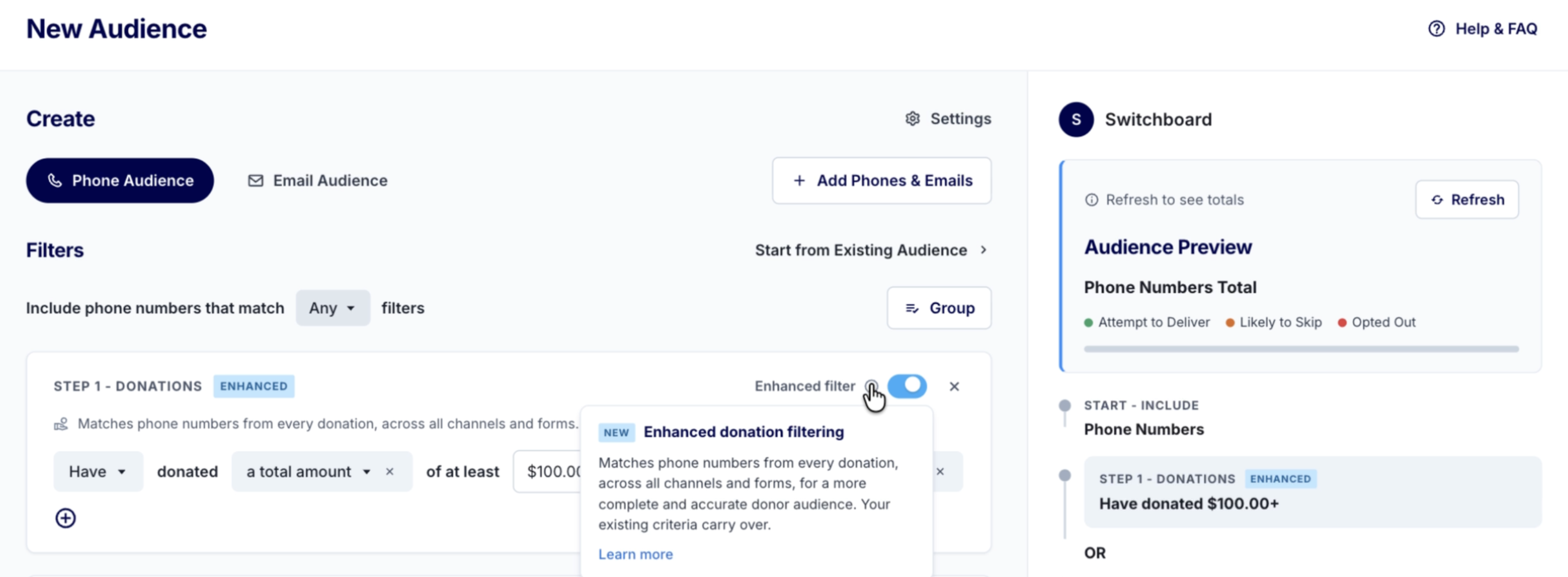
Look for the toggle in the Audience Builder the next time you're building a saved search.
📚 Learn more about the Enhanced Donation Filter →
📤 Import & Export Automatic Expansion Steps
If you reuse the same Automatic Expansion steps across broadcasts, you can now export them from one broadcast and import them into another — including drafts and broadcasts in other organizations. Export as JSON or YAML from the broadcast's Send Settings (if sent) or the Manage Expansions page (if draft/paused), then paste into the Import modal on your destination broadcast. Once you paste in your expansion steps you can edit them or add on to them as normal!
📚 Learn more about importing and exporting Automatic Expansion steps →
📱 iOS 27: Launch Observations
Apple officially launched iOS 27 on September 14th. Here's what we've observed since the official launch. Note that adoption of this new version is still low — less than 20% of the total iPhone user base. Read and save our iOS 27 memo with ongoing observations here!
Unknown Sender Inbox remains OFF by default, and the Spam folder is ON by default — same as we saw in the beta.
Images (of all formats except GIFs) from unknown senders are blurred with a "This is from an unknown sender. Tap to view." message overlay. In some cases, images appear as a file in the text thread instead of blurred — we're continuing to monitor this.
GIFs appear as a file in the text thread regardless of whether Unknown Sender Inbox is toggled on or off. Recipients can click the file to open it fullscreen in Messages.